
Meta AI
Screenshots
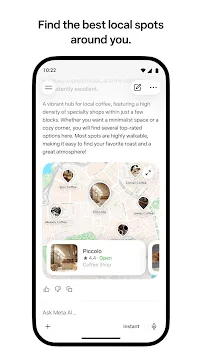
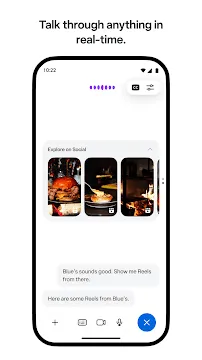
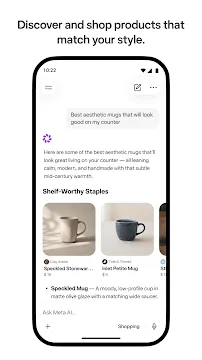
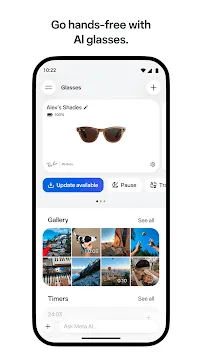

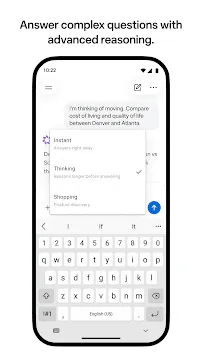


Meta AI offers a direct way to interact with smart assistance on mobile devices. You can use this tool to answer complex questions or create unique content. Users can find the official tool directly in the Google Play Store. It works as a separate, dedicated assistant for your daily mobile tasks.
Then, you can link the system with other social tools like Instagram or WhatsApp. This connection lets you pull insights from public posts or trending topics. The main goal remains simple. It helps you find clear answers quickly without leaving your phone screen. Therefore, you can save time during busy work days.
What Are the Core Meta AI Features?
Many users enjoy the basic functions that come with this modern tool. First, you can chat with the assistant using simple text commands. It processes your requests locally or through secure cloud systems. Second, the system handles complex data files with ease. For example, you can upload large documents or PDFs. Then, you can ask the assistant to summarize the main points. You can ask it to draft emails or write code. The assistant reads through massive data files within a few moments.
Furthermore, you can add images or spreadsheets to your ongoing chat. The tool compares different photos side by side. It extracts text from old receipts or documents. Consequently, you get faster insights without manual typing.
Here are some core functions you can try right now:
- Document summaries for long business reports.
- Data analysis for detailed office spreadsheets.
- Text extraction from scanned receipts or printed pages.
- Direct translations for multiple global languages.
These Meta AI features help people manage heavy workloads on smaller screens. You do not need a desktop computer to analyze complicated data sets. Instead, you can do everything from your handheld device.
How to Explore Advanced Meta AI Features Daily
Advanced users can unlock deeper levels of reasoning within the tool. You can toggle a specific mode called “Thinking” inside the chat interface. This mode allows the tool to think through questions step by step. Therefore, it provides logical breakdowns for math problems or coding tasks.
Additionally, the assistant provides excellent local search results. You can ask for restaurant recommendations in your specific neighborhood. The system draws information from real reviews and recent public posts. It checks what locals are buzzing about right now. You can discover popular hiking trails or quiet coffee shops. The helper tracks live updates to ensure high accuracy. However, it does not just give you a list of plain names.
- Direct links to business pages.
- Real-time operating hours.
- Comprehensive maps for easy navigation.
Instead, you receive comprehensive details for each location. These details include star ratings, current photos, and helpful user feedback. Therefore, you can plan weekend trips or dinner dates effortlessly. You always get up-to-date answers grounded in real-time trends.
Creative Tools in the New Meta AI Features
Media creation forms a large part of this modern mobile experience. You can use the built-in media tools to generate high-quality images from text. For instance, you type a short description of a scene. The tool then builds an illustration within seconds. You can modify the design by adding new prompts later.
Furthermore, a new feature called “Vibes” allows you to create expressive videos. You can animate your favorite still images with ease. You can even add yourself or your friends into these short clips. The system gives you complete control over your personal likeness.
This creative option includes these distinct options:
- Lip-synced dialogue for animated characters.
- Custom background music for short video clips.
- Pre-set visual themes for fast editing.
- Animation prompts to transform static landscapes.
These unique Meta AI features help content creators build quick social media posts. You can remix ideas from other global creators inside the feed. Consequently, your creative workflow becomes much faster and more enjoyable.
Privacy Settings in the Chat Experience
Privacy remains a top priority for mobile users who handle sensitive data. This tool includes a highly secure mode called Incognito Chat. When you open an Incognito Chat, you create a private space. This temporary conversation remains invisible to outside eyes.
In fact, the system processes your messages in a protected environment. Meta cannot see or read these specific text discussions. Therefore, you can ask personal questions about finance or health without worry. The messages disappear completely by default once you close the chat window. No anyone else can access your history during this mode. This makes the tool highly reliable for professional workers.
Furthermore, you can manage what the assistant remembers about you. The tool can memorize your professional interests or personal routines. However, you retain total control over this stored memory. You can view the memory logs or wipe the entire history at any time. This setup ensures your private information stays safe.
Connecting With Smart Wearables
The mobile tool connects seamlessly with modern smart hardware. Specifically, you can pair the tool with compatible AI glasses. This connection allows you to use the assistant hands-free while walking. You can leave your phone inside your pocket during outdoor activities.
Then, you can use simple voice commands to control the glasses. For example, you can tell the assistant to record a video. It captures high-quality clips from your own eye level. Additionally, the system supports live translation through open-ear audio. You can talk to people in foreign countries without using a separate translator device.
The wearable connection offers several benefits:
- Hands-free video recording during long trips.
- Open-ear audio for listening to music safely.
- Voice-controlled messaging over WhatsApp or Messenger.
- Real-time answers about landmarks using camera inputs.
Consequently, this system changes how you interact with the surrounding world. You look at an object, ask a question, and get answers instantly. It makes daily travel much easier and safer for everyone.
Smart Tips for Getting Better Search Results
To get the best results, you must write clear and specific prompts. The assistant responds better when you provide detailed context. Avoid short, vague questions like “give me ideas.” Instead, specify your target audience and desired tone. For instance, ask for “five dinner recipes under thirty minutes.”
Furthermore, take advantage of the file upload tools regularly. If you need help with a contract, upload the PDF directly. Ask the assistant to highlight potential risks or hidden fees. This method yields much better results than copying text manually.
Finally, remember to switch between chat modes when necessary. Use the instant mode for quick facts or weather updates. Switch to the reasoning mode for complex logical tasks. This simple habit improves your overall productivity significantly.
Conclusion
Meta AI offers a powerful set of tools for modern mobile users. It combines smart research, media creation, and deep reasoning into one system. You can handle office documents, design graphics, and explore local cities easily. The secure privacy options keep your personal data protected at all times. Furthermore, the wearable integration adds great value for hands-free tasks. By using specific prompts, you can maximize your daily efficiency. This free tool changes the way we find information on our phones. Download it today to upgrade your mobile productivity.
-
PowerDirector
 Download
PowerDirector - Video Editor
PowerDirector offers an incredible video editing experience...
- VITA – Video Editor & Maker
- Amazon Photos
- CapCut
- TIDAL Music
- Blurrr
- Apple Music
- Photo Editor